
Track Your Investment Portfolio with a Python Script
This walks through building a simple portfolio tracker in Python: pull your
holdings, fetch live prices with yfinance, and
calculate value and returns with pandas. It runs
entirely from a script, without a brokerage API or a paid data feed.
What you'll need
Three things, all free:
- Python installed (3.9 or newer works fine)
- Two packages:
yfinanceandpandas - A short list of your holdings (ticker, shares, and what you paid)
pip install yfinance pandas
Start with something easy and simple: a handful of tickers is enough to prove the script works before scaling it up to a full portfolio.
Step 1: Define your holdings
Keep this as plain data, not something clever. A dictionary of ticker to shares and cost basis is enough to start:
holdings = {
    "AAPL": {"shares": 12, "cost_basis": 168.40},
    "MSFT":  {"shares": 8,  "cost_basis": 402.10},
    "VTI":   {"shares": 25, "cost_basis": 251.75},
}
This is the only part that needs manual updating when a position changes. Everything downstream reads from it.
Step 2: Pull live prices with yfinance
yfinance wraps Yahoo Finance's public data and
hands back a ticker's current price in a couple of lines:
import yfinance as yf

def get_price(ticker):
    stock = yf.Ticker(ticker)
    return stock.history(period="1d")["Close"].iloc[-1]

for ticker in holdings:
    print(ticker, get_price(ticker))
Step 3: Calculate value and returns
With current prices in hand, pandas turns the
holdings dict into a table and does the math in a few lines:
import pandas as pd

rows = []
for ticker, info in holdings.items():
    price = get_price(ticker)
    market_value = price * info["shares"]
    cost = info["cost_basis"] * info["shares"]
    rows.append({
        "Ticker": ticker,
        "Shares": info["shares"],
        "Price": round(price, 2),
        "Market Value": round(market_value, 2),
        "Gain/Loss $": round(market_value - cost, 2),
        "Gain/Loss %": round((market_value / cost - 1) * 100, 2),
    })

df = pd.DataFrame(rows)
print(df)
print("Total value:", round(df["Market Value"].sum(), 2))
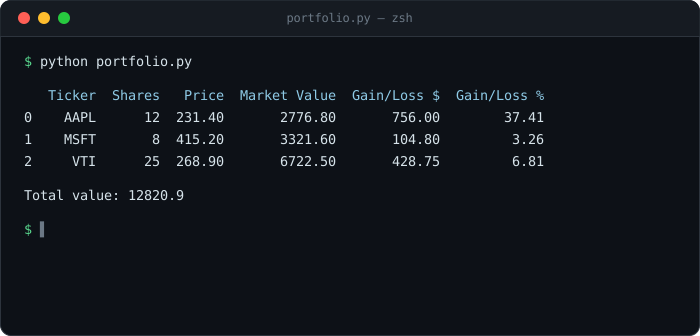
Running it prints something like:
Step 4: Visualize it (optional)
A chart isn't required to get value out of this, but a one-line allocation
plot makes the table easier to scan at a glance. This step needs one more
package: pip install matplotlib, since that's
what pandas' plotting calls run on under the hood.
df.set_index("Ticker")["Market Value"].plot.pie(autopct="%.0f%%")
Skip this step entirely if the table already does the job. It's a nice-to-have, and the tracker works fine without it.
Where this breaks down
No. yfinance pulls delayed data through an
unofficial API. It's fine for checking a portfolio once a day, but skip
it for anything time-sensitive.
Not handled automatically here. A dividend shows up as a price gap unless it's tracked separately as income, which is a reasonable thing to add once the base script is working.
Possibly, with a large number of tickers checked frequently. Yahoo Finance isn't a paid, rate-limit-guaranteed data source. A portfolio of a few dozen holdings checked once a day is unlikely to hit any limit.
Not by default. Everything above assumes the portfolio is priced in USD, so a non-USD holding needs its own currency-conversion step.
Taking it further
Once the base script works, a few natural next steps:
- Schedule it with cron (or Task Scheduler on Windows) to run once a day automatically
- Write the output to a CSV or Google Sheet instead of just printing it, to keep a history over time
- Pull holdings from a brokerage export instead of typing them in by hand
The Step 1 to 3 version above runs in about thirty lines of Python. Everything in this section is optional polish on top of it, not a prerequisite.
Prefer a spreadsheet over a script for this kind of tracking? The GOOGLEFINANCE walkthrough covers the same idea built entirely in Google Sheets.
← Back to DevsInvest